Captuvo Firmware Upgrade Tool3.06.1514
Publisher Description
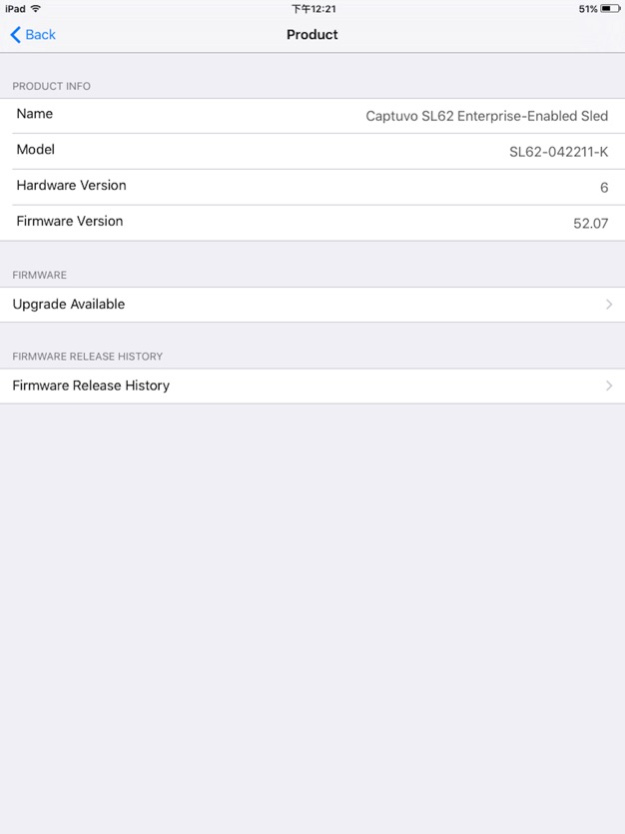
The Captuvo Firmware Update Tool is built to allow remote firmware updates on select Captuvo products. The tool is compatible with Honeywell Captuvo SL22/SL42/SL62 for Apple® iPod touch® 5th Generation and iPhone® 5th Generation and iPhone® 6th Generation/6th Generation Plus and Honeywell Captuvo SL62 for iPad mini®. The features of the utility include:
•Updating firmware on compatible Honeywell Captuvo SL22/SL42/SL62 models.
•Access to product information such as product name, model number, hardware version, and firmware version.
•Displays all the supported firmware and firmware release history.
Note: The tool is not compatible with SL22 for iPod touch 4th Generation due to architectural differences. In order for the application to work, the iPod touch 5, iPhone, or iPad mini must be seated and connected into the sled.
Sep 24, 2019
Version 3.06.1514
Add new FW 51.11 & FW 63.21.
About Captuvo Firmware Upgrade Tool
The company that develops Captuvo Firmware Upgrade Tool is Honeywell Scanning and Mobility. The latest version released by its developer is 3.06.1514.
To install Captuvo Firmware Upgrade Tool on your iOS device, just click the green Continue To App button above to start the installation process. The app is listed on our website since 2019-09-24 and was downloaded 38 times. We have already checked if the download link is safe, however for your own protection we recommend that you scan the downloaded app with your antivirus. Your antivirus may detect the Captuvo Firmware Upgrade Tool as malware if the download link is broken.
How to install Captuvo Firmware Upgrade Tool on your iOS device:
- Click on the Continue To App button on our website. This will redirect you to the App Store.
- Once the Captuvo Firmware Upgrade Tool is shown in the iTunes listing of your iOS device, you can start its download and installation. Tap on the GET button to the right of the app to start downloading it.
- If you are not logged-in the iOS appstore app, you'll be prompted for your your Apple ID and/or password.
- After Captuvo Firmware Upgrade Tool is downloaded, you'll see an INSTALL button to the right. Tap on it to start the actual installation of the iOS app.
- Once installation is finished you can tap on the OPEN button to start it. Its icon will also be added to your device home screen.
Program Details
System requirements
Download information
Pricing
Version History
version 3.06.1514
posted on 2019-09-24
Sep 24, 2019 Version 3.06.1514
Add new FW 51.11 & FW 63.21.
version 3.04.1452
posted on 2014-08-15
version 3.06.1514
posted on 1970-01-01
2019年9月24日 Version 3.06.1514
Add new FW 51.11 & FW 63.21.
version 3.06.1514
posted on 1970-01-01
2019년 9월 24일 Version 3.06.1514
Add new FW 51.11 & FW 63.21.
